
Manage your presentations at scale from Google Docs™
Turn Google Docs™ into a content management system for your evergreen and recurring presentations. Sync updates across Google Slides™ presentations in one click.
Turn Google Docs™ into a presentation content hub
Creating a single presentation is easy. Maintaining dozens or hundreds of them across your team over time? That needs a new workflow.
A source of truth for all your presentations
Manage multiple presentations from a single consolidated Google Doc™ content source. Not across many individual Google Slides™ files.

A searchable slide library
With your presentations in one place, easily search across all of them. No more digging through Drive™ to find stuff.

A collaboration hub
Google Docs is the natural place to co-author, review, and refine content with your team. Keep your team across all the latest updates.

A data source for your presentation charts and visualizations
Keep charts and other data visualizations in your presentations up to date with tables in Google Docs™.

Maintain brand consistency across every presentation
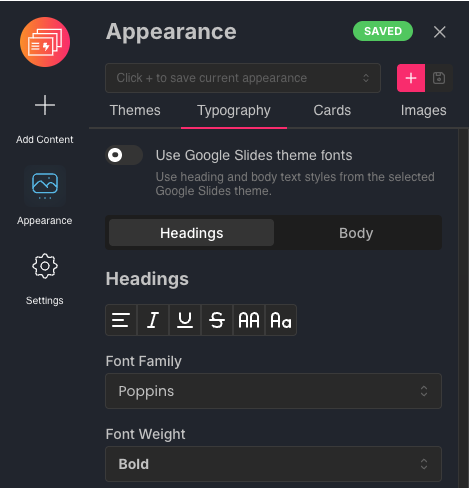
Keep all your presentations visually consistent and on-brand with typography, colors, and styling that apply across your presentations. Standardize them across your team with custom themes.
Privacy-first permissions
We only request what is needed to get the job done.
No storage of document content
We read Google Docs™ content that you've granted us access to create and update slides. No storage of document or presentation content in our database.
Least-privilege access
We only request permissions to access files that you choose. No unnecessary requests to access every document or presentation in your Google Drive™.
How it works
Manage content in Google Docs™
If your content already lives in Google Docs™, you're most of the way there. Our simple document structure keeps your slides in sync while keeping your content organized and easy to read.
Manage styling and branding from SlideAdmin
Set your custom theme, typography, colors and styling from one place in SlideAdmin. These are automatically applied to all managed presentations in a source Google Doc™. See your changes immediately in the high-fidelity slide previews.
Sync updates to Google Slides™ over time
Sync updates from Google Docs™ to the same linked Google Slides™ files as your presentation content changes and evolves over time.
Who it's for
Built for people who maintain presentations long after the first draft.
Education & training
Keep lessons and training materials consistent across classes, instructors, and campuses. Update your source content as the curriculum changes, then sync changes to your managed presentations.
Business reporting
Maintain recurring KPI reports, management updates, and board presentations. Keep the charts in your managed presentations in sync with data tables in your Google Docs™.
Organizations & teams
Keep shared presentation content and branding consistent across teams. Use a team workspace to find source documents and maintain the presentations that your team relies on.
Pricing
Free
Start managing your first presentation from Google Docs.
$0
/ month
What's included
- 1 managed presentation
- 20 slides included
- Google Docs™ as your content source
- Sync Google Docs™ to Google Slides™
- Standard support
Plus
Keep a growing collection of presentations up to date.
$49
/ month
What's included
- 100 managed presentations
- Sync Google Docs™ to Google Slides™
- Custom themes and branding
- SlideAdmin branding removed
- Shared team workspace
- Unlimited team members
- Standard support
Pro
Manage more presentations as your team grows.
$99
/ month
What's included
- 300 managed presentations
- Everything in Plus
Enterprise
For organizations managing presentations across teams.
From
$499
/ month
What's included
- Custom presentation allowance
- Everything in Pro
- Custom integrations
- Dedicated onboarding
- Security and compliance support
- Annual invoicing / purchase orders
A managed presentation is a Google Slides™ deck linked to a source Google Doc.
Compare plans
Choose the capacity and team support that fit your presentations.
| Features | Free$0 / month | Plus$49 / month | Pro$99 / month | EnterpriseFrom $499 / month |
|---|---|---|---|---|
| Presentation management | ||||
| Managed presentations | 1 | 100 | 300 | Custom |
| Google Docs™ as the content source | Included | Included | Included | Included |
| Google Slides™ sync | Included | Included | Included | Included |
| Custom themes and branding | Not included | Included | Included | Included |
| SlideAdmin branding removed | Not included | Included | Included | Included |
| Team collaboration | ||||
| Shared team workspace | Not included | Included | Included | Included |
| Unlimited team members | Not included | Included | Included | Included |
| Support and enterprise services | ||||
| Standard support | Included | Included | Included | Included |
| Custom integrations | Not included | Not included | Not included | Included |
| Dedicated onboarding | Not included | Not included | Not included | Included |
| Security and compliance support | Not included | Not included | Not included | Included |
| Annual invoicing / purchase orders | Not included | Not included | Not included | Included |
Frequently Asked Questions
Everything you need to know about SlideAdmin.
Still have questions?
We’re here to help.